Partner Guide: Understanding PayItMonthly Pre-Check
Pre-Check allows you to check whether a customer is likely to be approved for PayItMonthly monthly payments before they complete a full finance agreement.
By performing a quick soft credit check (which has no negative impact on your customer’s credit score), you get fast, reliable insights into their eligibility and monthly affordability.
Key Benefits
- Avoid Awkward Conversions and Save Time: Know eligibility upfront to prevent the awkwardness of a declined full application.
- No Credit Score Impact: Soft checks ensure your customer's credit score is not negatively affected.
- Lightning Fast: Most results return in under 15 seconds.
- Affordability Guidance: See an estimate of your customer's monthly budget to suggest payment plans that fit their circumstances.
- 1-Click Conversion: Instantly start a full finance application straight from a successful Pre-Check result.
- 7-Day Validity: Results stay valid for 7 days, giving your customer time to think without losing their status.

Account Eligibility & Pricing
- Plus & Pro Accounts: Included permanently at no extra cost.
- PAYG Accounts: Available free of charge for a limited time to help maximize your seasonal sales.
How to Use Single Pre-Check
You can find the Pre-Check feature inside the Agreements section of the PayItMonthly app, right alongside your Signed and Unsigned agreements.
Agreements > Pre-Check > +New Pre-Check (button)
Step-by-Step Process:
1. Create the Pre-Check
Navigate to Agreements and click on the ‘Pre-Check’ tab.
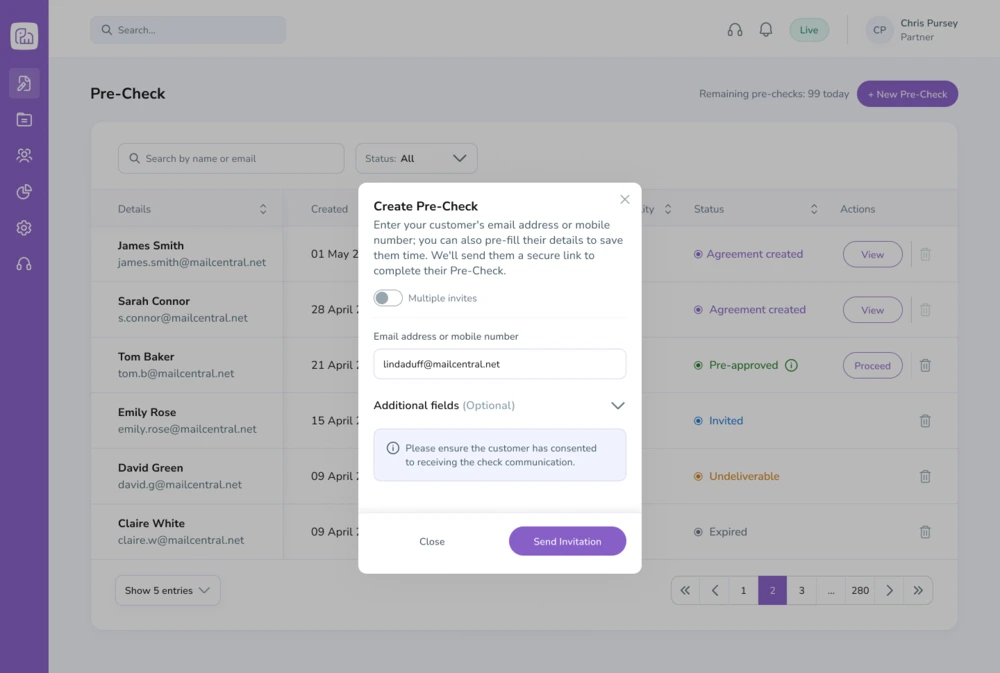
Once the Pre-Check area opens you will see current and old Pre-Checks, you will also see a purple button on the top right of your page called ‘+New Pre-Check’
Once you click on this you can either:
- Enter your customer’s basic details (Name, Date of Birth, Address)
Note: Please ensure that your customer is happy for you to provide us with their data prior to doing so.
or
- Send them a blank link to fill out the details on their own device.
2. Customer Completion
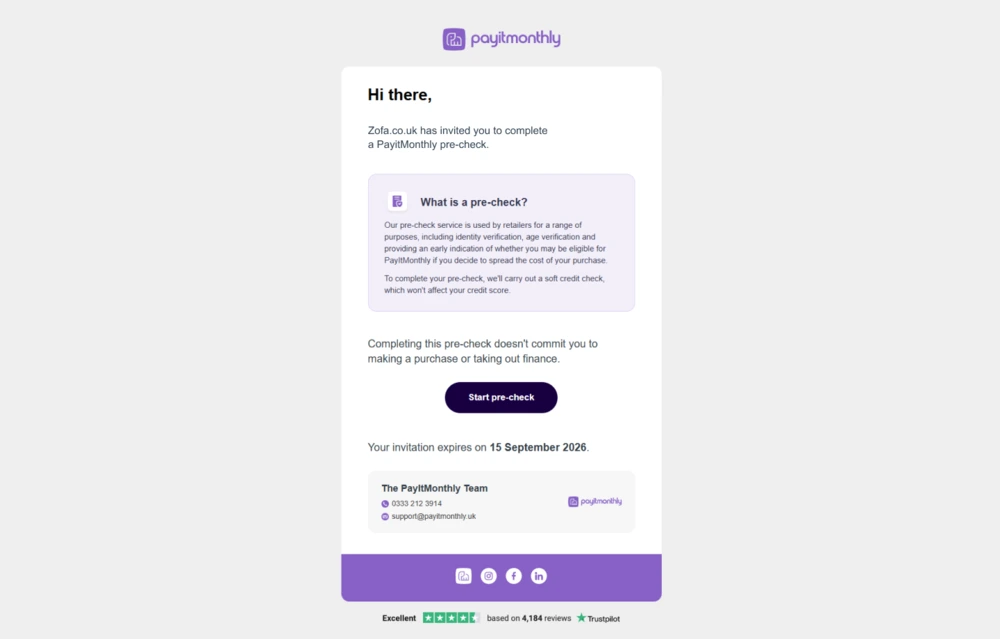
Your customer receives an invitation via Email or SMS. They complete the short form to initiate the soft check.
3. Review the Results
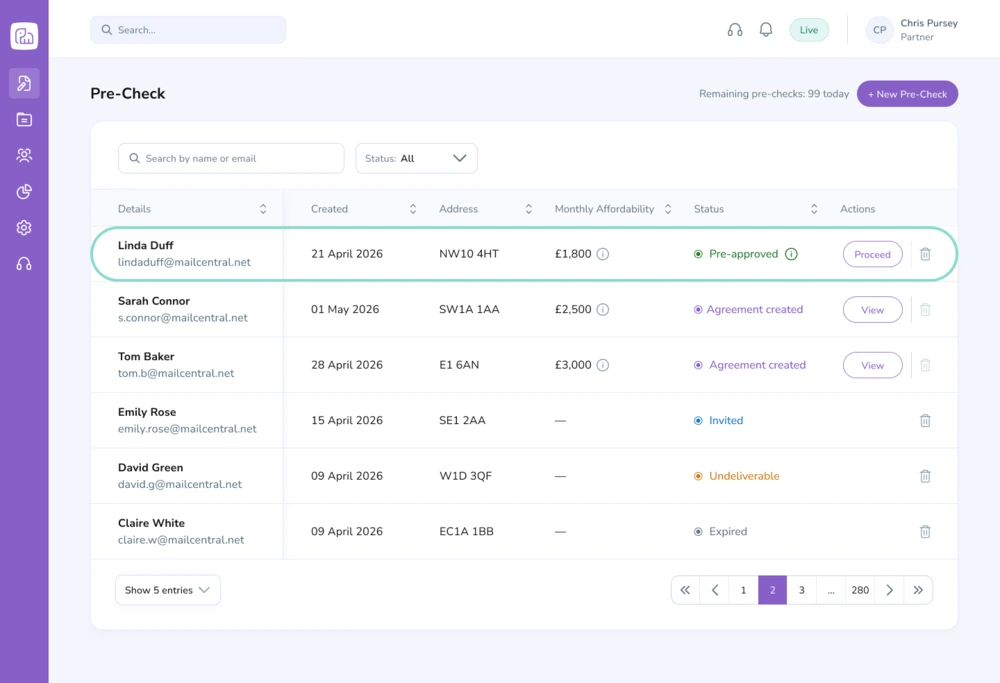
Within roughly 15 seconds, you will receive an indication of eligibility alongside an estimated monthly affordability guide. We recommend you use this information to tailor your offer to a budget that’s affordable.
4. Convert to Full Application
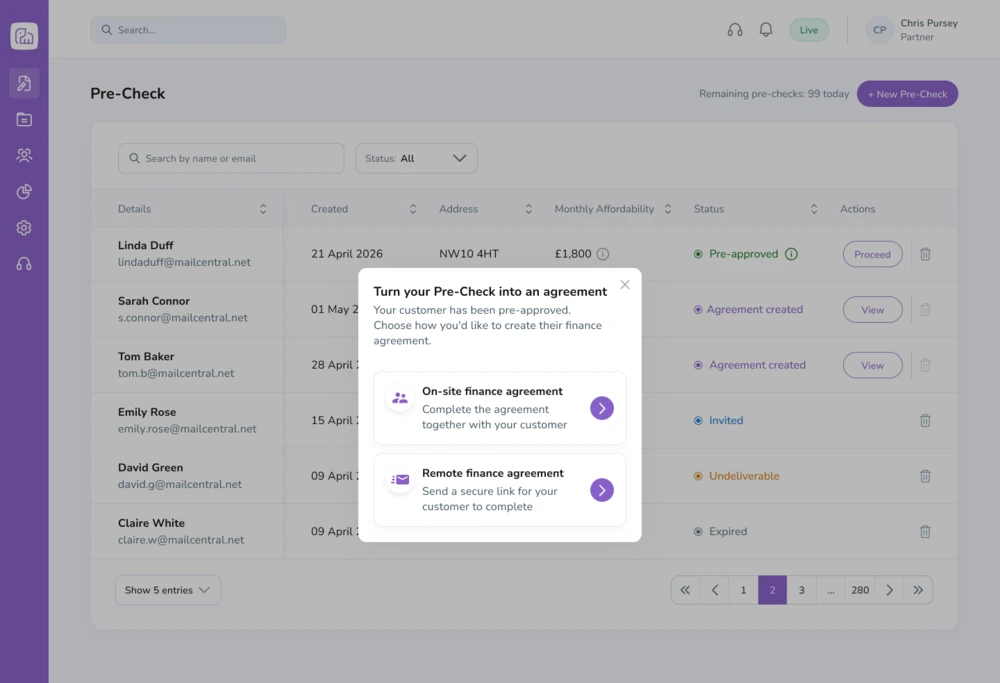
If the ‘status’ column shows “Pre-approved” you can convert this Pre-Check to a full application, to do this click ‘Proceed’ you can then select if you would your customers agreement to be completed in store or remotely via their device. Both options will automatically populate your customers PayItMonthly application, so there is no need to re-enter customer data saving you and your customer time.
Multiple Invites Feature
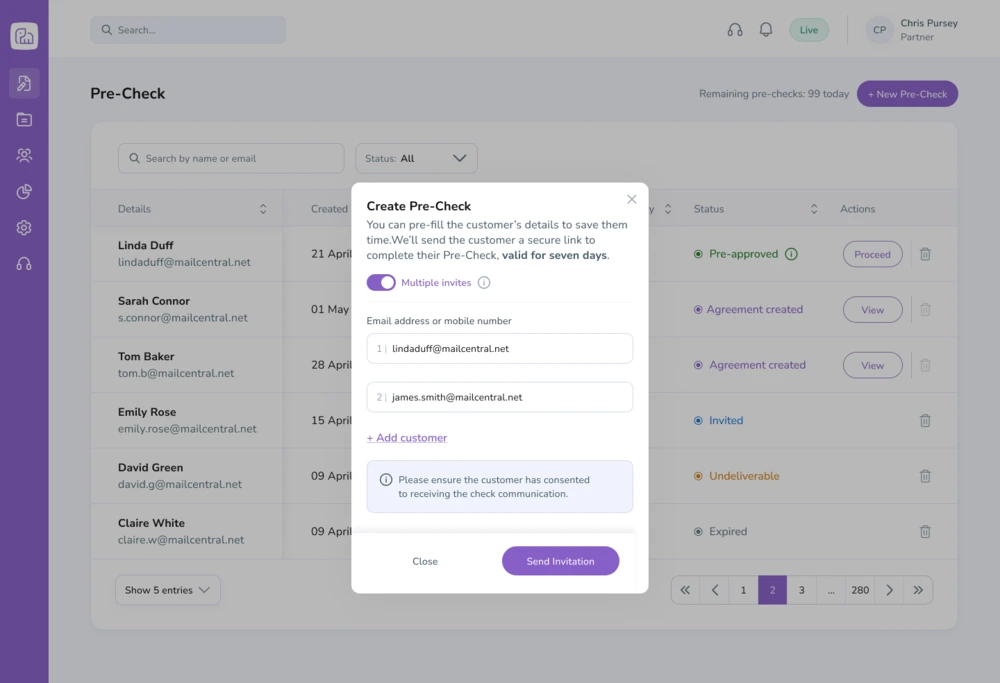
Planning a promotional event, preparing for showroom appointments, or reaching out to an existing customer list? Use Multiple Invite feature to run checks in bulk.
- How it helps: Pre-qualify entire groups of prospective buyers ahead of time so you can focus your energy on customers who are ready and able to buy.
- Where to find it: Located within the ‘+New Pre-Check' / Create Pre-Check form, you just need to toggle ‘Multiple Invites’.
- Data entry not available: You cannot enter your customers details for them in a Pre-Check which is invited via the ‘Multiple Invite’ feature, instead you just provide a list of email addresses or mobile numbers.
Frequently Asked Questions
Does Pre-Check leave a hard search on the customer's credit file? No. Pre-Check relies strictly on a soft credit check, meaning it will not negatively affect your customer's credit score.
How long is a Pre-Check valid? Each result is valid for 7 days. If the customer returns to buy within that window, you can convert it directly into an application without re-entering information to save time.
Does this guarantee approval? No. Pre-check is intended as a check for whether a customer is likely to be approved for PayItMonthly monthly payments before they complete a full finance agreement and not a 100% guarantee to the final decision.
Top Tip
Use “Multiple Invite” feature before big events or showroom days to pre-qualify your customer list in bulk so you can spend your time closing sales with ready, eligible buyers.
Need Extra Help?
If you have questions about using Pre-Check or want assistance setting up your first campaign, our team is happy to help!
By Alex Keith
January 20, 2026